OpenCode 接入教程
三步完成配置:安装 → 写入配置文件 → 运行
第一步:安装 OpenCode
🍎 macOS / Linux
🪟 Windows
方法一(推荐):官方脚本
curl -fsSL https://opencode.ai/install | bash
方法二:Homebrew(macOS)
brew install opencode-ai/tap/opencode
方法三:npm
npm install -g opencode-ai
验证:
opencode --version
方法一(推荐):Scoop
# 未安装 Scoop 先执行这两行
Set-ExecutionPolicy -ExecutionPolicy RemoteSigned -Scope CurrentUser
Invoke-RestMethod -Uri https://get.scoop.sh | Invoke-Expression
# 安装 OpenCode
scoop bucket add opencode https://github.com/opencode-ai/scoop-bucket
scoop install opencode
Set-ExecutionPolicy -ExecutionPolicy RemoteSigned -Scope CurrentUser
Invoke-RestMethod -Uri https://get.scoop.sh | Invoke-Expression
# 安装 OpenCode
scoop bucket add opencode https://github.com/opencode-ai/scoop-bucket
scoop install opencode
方法二:npm
npm install -g opencode-ai
验证:
opencode --version
第二步:写入配置文件
创建以下路径的 opencode.json 文件(不存在时手动创建目录):
| 系统 | 配置文件路径 |
|---|---|
| macOS / Linux | ~/.config/opencode/opencode.json |
| Windows | %APPDATA%\opencode\opencode.json |
| (可选)项目级 | 项目根目录下的 opencode.json |
文件内容(将 sk-你的密钥 替换为你的 AIHUB API Key):
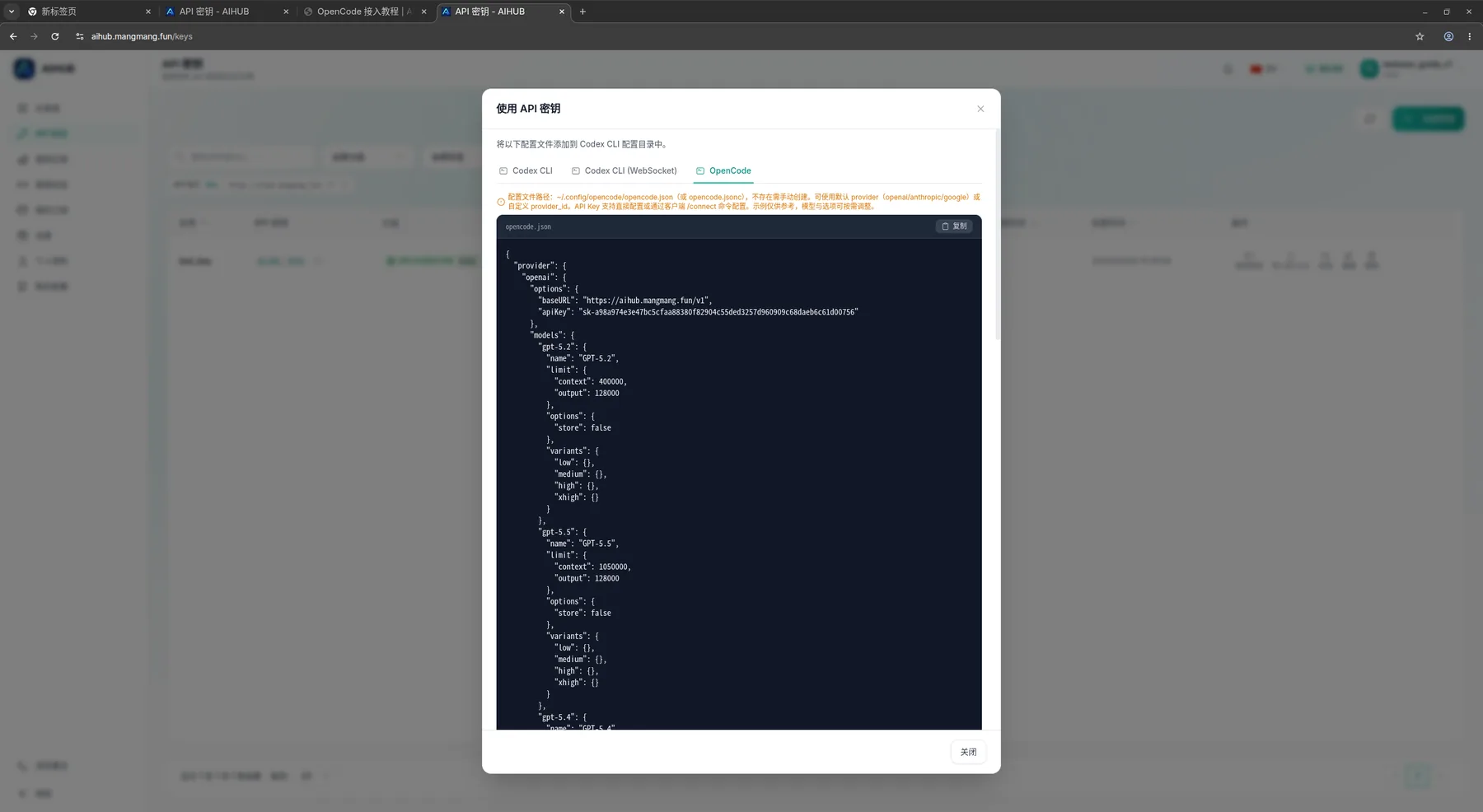
AIHUB「使用密钥」→ OpenCode 标签 — 可直接复制下方配置
{
"provider": {
"openai": {
"options": {
"baseURL": "https://aihub.mangmang.fun/v1",
"apiKey": "sk-你的密钥"
},
"models": {
"gpt-5.2": { "name": "GPT-5.2", "limit": { "context": 400000, "output": 128000 }, "options": { "store": false }, "variants": { "low": {}, "medium": {}, "high": {}, "xhigh": {} } },
"gpt-5.5": { "name": "GPT-5.5", "limit": { "context": 1050000, "output": 128000 }, "options": { "store": false }, "variants": { "low": {}, "medium": {}, "high": {}, "xhigh": {} } },
"gpt-5.4": { "name": "GPT-5.4", "limit": { "context": 1050000, "output": 128000 }, "options": { "store": false }, "variants": { "low": {}, "medium": {}, "high": {}, "xhigh": {} } },
"gpt-5.4-mini": { "name": "GPT-5.4 Mini", "limit": { "context": 400000, "output": 128000 }, "options": { "store": false }, "variants": { "low": {}, "medium": {}, "high": {}, "xhigh": {} } },
"gpt-5.3-codex-spark": { "name": "GPT-5.3 Codex Spark", "limit": { "context": 128000, "output": 32000 }, "options": { "store": false }, "variants": { "low": {}, "medium": {}, "high": {}, "xhigh": {} } },
"gpt-5.3-codex": { "name": "GPT-5.3 Codex", "limit": { "context": 400000, "output": 128000 }, "options": { "store": false }, "variants": { "low": {}, "medium": {}, "high": {}, "xhigh": {} } },
"codex-mini-latest": { "name": "Codex Mini", "limit": { "context": 200000, "output": 100000 }, "options": { "store": false }, "variants": { "low": {}, "medium": {}, "high": {} } }
}
}
},
"agent": {
"build": { "options": { "store": false } },
"plan": { "options": { "store": false } }
},
"$schema": "https://opencode.ai/config.json"
}
"provider": {
"openai": {
"options": {
"baseURL": "https://aihub.mangmang.fun/v1",
"apiKey": "sk-你的密钥"
},
"models": {
"gpt-5.2": { "name": "GPT-5.2", "limit": { "context": 400000, "output": 128000 }, "options": { "store": false }, "variants": { "low": {}, "medium": {}, "high": {}, "xhigh": {} } },
"gpt-5.5": { "name": "GPT-5.5", "limit": { "context": 1050000, "output": 128000 }, "options": { "store": false }, "variants": { "low": {}, "medium": {}, "high": {}, "xhigh": {} } },
"gpt-5.4": { "name": "GPT-5.4", "limit": { "context": 1050000, "output": 128000 }, "options": { "store": false }, "variants": { "low": {}, "medium": {}, "high": {}, "xhigh": {} } },
"gpt-5.4-mini": { "name": "GPT-5.4 Mini", "limit": { "context": 400000, "output": 128000 }, "options": { "store": false }, "variants": { "low": {}, "medium": {}, "high": {}, "xhigh": {} } },
"gpt-5.3-codex-spark": { "name": "GPT-5.3 Codex Spark", "limit": { "context": 128000, "output": 32000 }, "options": { "store": false }, "variants": { "low": {}, "medium": {}, "high": {}, "xhigh": {} } },
"gpt-5.3-codex": { "name": "GPT-5.3 Codex", "limit": { "context": 400000, "output": 128000 }, "options": { "store": false }, "variants": { "low": {}, "medium": {}, "high": {}, "xhigh": {} } },
"codex-mini-latest": { "name": "Codex Mini", "limit": { "context": 200000, "output": 100000 }, "options": { "store": false }, "variants": { "low": {}, "medium": {}, "high": {} } }
}
}
},
"agent": {
"build": { "options": { "store": false } },
"plan": { "options": { "store": false } }
},
"$schema": "https://opencode.ai/config.json"
}
🔑
API Key 在 AIHUB → API 密钥 页面获取,点击「使用密钥」→ OpenCode 标签可直接复制完整配置。
macOS / Linux 一键创建
mkdir -p ~/.config/opencode
# 用你自己的 key 替换 sk-xxx
cat > ~/.config/opencode/opencode.json << 'EOF'
{ "provider": { "openai": { "options": { "baseURL": "https://aihub.mangmang.fun/v1", "apiKey": "sk-xxx" } } }, "$schema": "https://opencode.ai/config.json" }
EOF
# 用你自己的 key 替换 sk-xxx
cat > ~/.config/opencode/opencode.json << 'EOF'
{ "provider": { "openai": { "options": { "baseURL": "https://aihub.mangmang.fun/v1", "apiKey": "sk-xxx" } } }, "$schema": "https://opencode.ai/config.json" }
EOF
Windows PowerShell 一键创建
New-Item -Path "$env:APPDATA\opencode" -ItemType Directory -Force
'{ "provider": { "openai": { "options": { "baseURL": "https://aihub.mangmang.fun/v1", "apiKey": "sk-xxx" } } }, "$schema": "https://opencode.ai/config.json" }' | Set-Content "$env:APPDATA\opencode\opencode.json"
'{ "provider": { "openai": { "options": { "baseURL": "https://aihub.mangmang.fun/v1", "apiKey": "sk-xxx" } } }, "$schema": "https://opencode.ai/config.json" }' | Set-Content "$env:APPDATA\opencode\opencode.json"
⚠️ 一键创建命令只写入基础配置,不含 models 字段。如需指定模型,请手动编辑文件添加上方完整内容。
第三步:运行 OpenCode
# 进入项目目录后直接运行
cd /你的项目目录
opencode
# 指定模型
opencode --model openai/gpt-5.5
# 直接提问(非交互模式)
opencode "分析这个项目的目录结构"
cd /你的项目目录
opencode
# 指定模型
opencode --model openai/gpt-5.5
# 直接提问(非交互模式)
opencode "分析这个项目的目录结构"
TUI 常用快捷键
| 快捷键 | 功能 |
|---|---|
Enter | 发送 |
Ctrl + J | 换行(不发送) |
Ctrl + C | 中止生成 |
Ctrl + N | 新对话 |
q / Ctrl+D | 退出 |
/ | Slash 命令 |
📋 支持的模型(AIHUB)
| 模型 ID | 名称 | 上下文 | 最大输出 |
|---|---|---|---|
openai/gpt-5.5 | GPT-5.5 | 1,050,000 | 128,000 |
openai/gpt-5.4 | GPT-5.4 | 1,050,000 | 128,000 |
openai/gpt-5.4-mini | GPT-5.4 Mini | 400,000 | 128,000 |
openai/gpt-5.3-codex | GPT-5.3 Codex | 400,000 | 128,000 |
openai/gpt-5.2 | GPT-5.2 | 400,000 | 128,000 |
openai/gpt-5.3-codex-spark | GPT-5.3 Codex Spark | 128,000 | 32,000 |
openai/codex-mini-latest | Codex Mini | 200,000 | 100,000 |
❓ 常见问题
「no provider configured」
检查配置文件路径是否正确,JSON 格式是否有效,可用 jsonlint.com 验证。
如何从 AIHUB 获取完整配置?
登录 → API 密钥 → 点击「使用密钥」→ 选 OpenCode 标签 → 复制 → 粘贴到配置文件,替换 API Key 即可。
🔄
多个 API Key 切换?推荐 CC Switch,无需手动修改配置文件。